

You put the EA on the VPS, went to sleep, and woke up to a position size you didn’t recognise. The terminal had restarted overnight. Static variables, global arrays, and in-memory state all reset to zero when MetaTrader closes — any EA that doesn’t persist critical state to disk will silently misbehave on every restart.
The EA had opened a new trade on a basket that was already running, doubling the exposure it was supposed to manage. It reconnected, found its in-memory state empty, and treated the session as a fresh start. This is state loss on restart — not a conventional code bug, since the logic runs correctly within any single session. The problem is what the EA forgets when the session ends.
The Restart Looks Harmless — Until It Isn’t
When MetaTrader reconnects after a terminal restart, almost everything appears normal. The chart loads. Indicator values repopulate. Open positions are visible in the trade tab. From the outside, it looks like the EA picked up exactly where it left off.
But there is one category of data that never comes back: anything the EA computed or tracked during the previous session and held only in memory.
That basket recovery EA tracks its open positions in a static array. The logic is sound — it compares the array length against live positions to decide whether to open the next recovery trade. What it doesn’t do is rebuild that array from the terminal’s actual order pool when it initialises. On restart, the array is empty. The live positions are still open. The EA compares empty array (0 trades) against its entry condition (0 trades = open baseline), finds a match, and executes.
We have documented this pattern in several client systems — doubled exposure after an overnight VPS reboot in one — and it is a standard check in code rescue work. The root cause is the same each time: the EA trusts what’s in memory instead of what’s actually in the market. This failure mode is especially common in AI-generated EAs, where lifecycle handling is rarely implemented.
What “State” Actually Means in an EA
When developers talk about state, they usually mean it loosely — “the EA’s current condition.” In MQL, there’s a more precise taxonomy, and understanding it is what separates robust EAs from fragile ones.
Tick-scoped state are regular local variables declared inside OnTick() or a function it calls. They exist for one execution cycle and are discarded. No persistence, no accumulation.
Session-scoped state are static variables and globally declared arrays. These survive between OnTick() calls within a session — they accumulate, update, and persist as long as the terminal is running. When the terminal closes, they reset to their declared initial values. Zero, false, empty.
Persistent state is anything explicitly written to external storage: a file, a GlobalVariable with a flush call. This survives terminal restarts because it lives on disk, not in process memory.
The practical implication: any value that takes multiple ticks or multiple trades to build up — a count, a sequence step, a reference price, a high-water mark — belongs in persistent storage if it needs to survive a restart. Keeping it in a static variable is keeping it in RAM. RAM clears on restart.
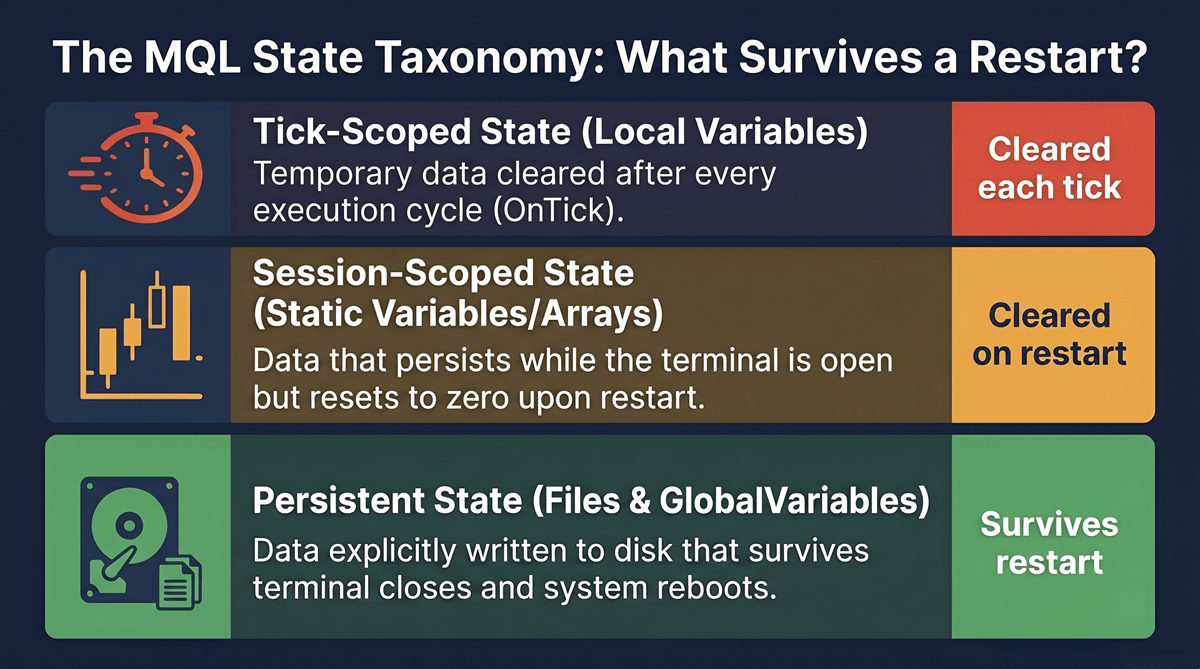
A concrete illustration:
// Tick-scoped: gone after each OnTick() call
int localCount = 0;

// Session-scoped: survives between ticks, resets on terminal restart
static int sessionCount = 0;

// Persistent: survives terminal restart
GlobalVariableSet("persistCount", value);
Most EA developers learn the difference between the first and second category early. The second and third category — that’s where production failures live.
The Five Things EAs Forget on Restart
Not every state loss causes a visible failure. Some information the EA can reconstruct cheaply — current price, indicator values, open profit. But five categories of state, when lost, produce specific and costly symptoms.
1. Position tracking array. The EA builds a list of its own open trades — entry prices, lots, tickets, sequence relationships — in a static array or struct array. On restart, the array is empty. The EA sees no open trades and re-opens the baseline position. Result: doubled exposure, sometimes tripled if the reconnect is unstable.
2. Trailing stop reference price. The EA tracks the highest price reached since a long trade opened to know where the stop should trail. On restart, that reference resets to zero or to the current price. If the current price is lower than the actual high-water mark, the EA trails from the wrong origin — stops move prematurely or the trail logic abandons the move it was tracking.
3. Recovery sequence step. A martingale or grid EA tracks which lot size comes next in the sequence. If step 4 was the last executed trade (lot size 1.6×), a restart resets the counter to step 1 (lot size 0.1×). The EA is now under-exposed for the position it’s managing, or it opens a new entry at the wrong lot size when the sequence should have continued.
4. Cooldown timer. Many EAs impose a lockout period after a losing trade — no new entries for N minutes or until the next session. The timer lives in a static variable. On restart, the elapsed time is zero and the lockout is gone. If the last trade before the restart was a loss, the EA starts fresh with no memory of it.
5. Profit lock level. EAs that protect an accumulated profit target — “lock in $50 when equity reaches $150” — store the lock level in memory. On restart, the lock level resets. The EA starts protecting from zero again, potentially trailing a stop below an already-locked profit level.
Each of these produces a recognisable pattern in the trade history. If you’ve seen inexplicable lot size jumps, stops that move backward, or trades that open when they shouldn’t — check when the terminal last restarted.
Two Persistence Approaches and When to Use Each
MQL offers two native mechanisms that survive restarts. The right choice depends on what you’re storing.
| Aspect | GlobalVariables | File I/O |
|---|---|---|
| API | GlobalVariableSet() / GlobalVariableGet() | FileOpen() / FileWrite() / FileRead() |
| Data types | Double only | Any format (CSV, structured text) |
| Best for | Scalar values: sequence step, high-water mark, lock level, cooldown timestamp | Structured state: position lists, multi-attribute trade sequences |
| Code volume | Minimal | More to write |
| Main limitation | Cannot store arrays, structs, or strings | Requires manual serialization |
| Choose when | 1–5 independent scalar values | Position tracking or any state with multiple attributes per record |
GlobalVariables (GlobalVariableSet() (opens in a new tab) / GlobalVariableGet() (opens in a new tab)) are MetaTrader’s key-value store, backed by a file the terminal manages automatically. Best for scalar values — the current sequence step, a high-water mark price, a lock level, a cooldown expiry timestamp. The API is simple, the overhead is low.
File I/O (FileOpen (opens in a new tab), FileWrite, FileRead) gives you full control. Write any format you need — a comma-separated row per open position with ticket, lots, entry price, and sequence step. On OnInit(), read the file back and reconstruct the in-memory state. More code to write. Complete flexibility.
At barmenteros FX, when we add persistence infrastructure to an existing EA, the choice is usually file I/O — GlobalVariables cover simple counters and locks, but EA state at the level that actually causes failures tends to be structured.
When NOT to persist. Read-only market data — current bid/ask, indicator values, open P&L — should never be persisted. These values are always available from the terminal and will be stale the moment you read them back from disk. Persisting them adds code complexity and creates a new failure mode: the EA acting on stale cached values instead of live market data.
The OnInit() Restore Pattern
Persistence only works if the EA reads it back on startup. OnInit() is the correct place — it runs once per session, before the first OnTick() fires. The pattern is always the same:
- Attempt to load saved state. Try to read the file or GlobalVariable.
- If found, validate and restore. Don’t trust the saved state blindly — reconcile it against the live order pool first.
- If not found, initialise from scratch. First-ever run, or state file was deleted. Set everything to defaults and proceed normally.
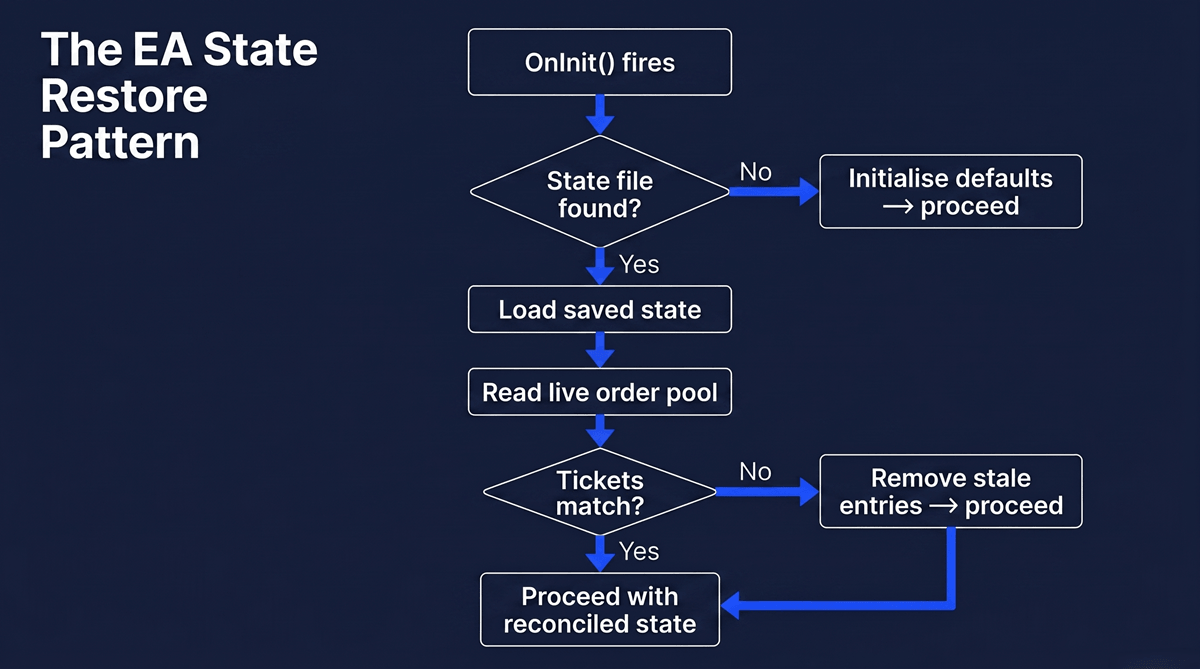
The reconcile step is critical and frequently skipped. If the saved state says the EA had 3 open trades but the terminal shows 2, the state is stale — one trade closed during the downtime. If you restore the stale state without checking, the EA will calculate exposure, sequence steps, and trailing references against a trade that no longer exists.
The correct sequence: load the state file → read live positions from the order pool → cross-reference by ticket number → remove any saved positions that aren’t in the live order pool → proceed with the reconciled state.
This single pattern handles VPS reboots, broker disconnections, intentional chart reloads, and MetaTrader updates. The EA doesn’t care why it restarted. It loads, reconciles, and continues.
What You Cannot Persist (and the Alternative)
Two categories of data feel like EA state but aren’t. Persisting them creates a different class of bugs — stale values that override live market reality.
Indicator values. The RSI reading from the last tick before the restart is worthless after the restart. The correct value is available directly from the indicator buffer the moment OnTick() fires. Never cache indicator values across sessions.
Open P&L. A persisted “current basket profit = $47.30” is wrong the moment the market moves, let alone after a multi-hour restart. Always calculate open P&L from live positions.
A useful test: “Would this value change if the market moved while the terminal was off?” If yes, don’t persist it — derive it fresh on restart. Only values that exist independently of current market prices belong in persistent storage.
How to Test Whether Your EA Survives a Restart
State persistence is an architectural decision, not a feature you add later. The EAs that handle restarts cleanly were designed that way from the first OnInit(). The ones that fail were designed for a world where restarts don’t happen — and VPS machines do restart, brokers do disconnect, and MetaTrader does update.
The mental model: any value that takes time or trades to build up needs to survive a restart. Anything you’d lose if the power went out belongs in persistent storage. Everything else can be derived fresh.
If you have a running EA with complex state management — basket logic, recovery sequences, trailing references — and you’ve never verified its restart behaviour, test it now. Restart the terminal with live positions open and watch what it does on reconnect. The answer tells you whether you have a production EA or a backtest EA running on a live account.

Leave a Reply